
Microsoft Copilot Is Changing. Here’s What Businesses Need to Know
Copilot Credits, usage-based billing and the new January–March 2027 date: what’s changing in Microsoft Copilot and what your business should do now.
November 24, 2026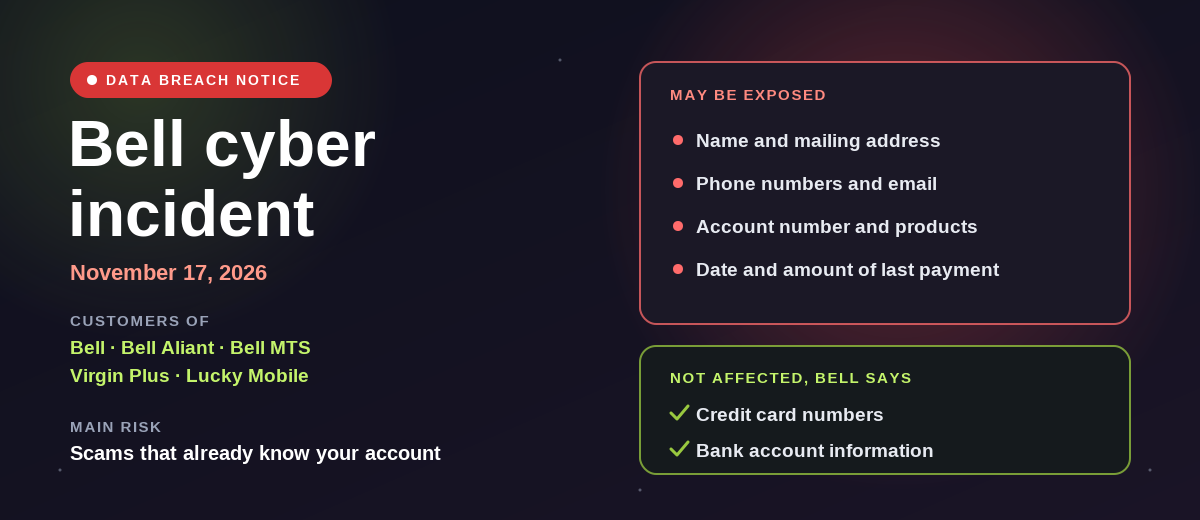
On November 17, 2026, someone broke into some of Bell Canada's internal systems and took customer information. Bell confirmed the incident to business customers on November 20, and residential and mobile customers started receiving notices by email on November 22 and 23.
Bell says the intruder obtained information about both residential and business customers of Bell, Bell Aliant, Bell MTS, Virgin Plus and Lucky Mobile. It has not said how many customers were affected, and it says it doesn't yet know who was behind the attack.
Bell describes the attacker as an "agentic" threat actor, a term usually used for attacks run with the help of AI agents. More on what that means, and what it doesn't, below.
The good news first: Bell says no credit card numbers or banking information were accessed, and that customer services weren't disrupted.
The real risk is what comes next. The information that was taken is exactly what a scammer needs to sound like Bell: your name, your phone number, your account number, what services you have and the date and amount of your last payment. A call or text that gets all of that right is very hard to tell from the real thing.
So the question for most organizations isn't "were we hacked?" It's "would our people fall for a call that sounds exactly like Bell?"
Do we, or any of our staff, have phones or internet with Bell, Bell Aliant, Bell MTS, Virgin Plus or Lucky Mobile?
Would staff know to hang up and call back on the number printed on the bill, rather than one the caller gives them?
Do our mobile accounts have a PIN or passcode, and does everyone know never to share it, or a one-time code, with a caller?
If we're a Bell business customer, have we asked our Bell account team whether our organization's data was involved?
Bell's notices describe two groups of customers, with different information involved.
According to Bell's customer notice, this may include name, mailing address, phone numbers, email address, account number, product information, and the date and amount of the last payment.
Bell says the stolen data includes business contact information. Reports of Bell's notice to business customers also mention job titles, ticket titles and some IP addresses tied to network equipment.
Bell says the attacker got into some of its systems, including one used to order and set up business circuits (the network connections Bell provides to businesses). Bell also says no highly sensitive personal information, such as credit card numbers or bank account information, was accessed. It says it removed the attacker, contained the incident and has engaged the RCMP's cybercrime unit.
Bell is warning customers to be wary of anyone contacting them as Bell, and says it will never contact you to ask for bank account information, passwords or PINs. Given what was taken, these are the kinds of approaches we'd expect to see:
The rule that beats all of them: if Bell contacts you, hang up or don't click, then contact Bell yourself using the number on your bill or the official website. A real Bell agent won't mind.
A two-line message is enough: "Bell had a data breach. If anyone calls, texts or emails claiming to be Bell, even if they know our account details, don't give them anything. Hang up and check with [name]." Include staff who use their own Bell, Virgin Plus or Lucky Mobile phone for work.
Knowing your account number or last payment is no longer proof that a caller is from Bell. Contact Bell through the number on your bill or through bell.ca, never through a number or link in the message.
Bell says it will never ask for these. One-time codes matter most: they're often all an attacker needs to take over an account, or to move your phone number to their SIM card and receive your text-message login codes.
Make sure every business mobile account has a PIN or passcode set, that you know who's authorized to make changes, and that your carrier login uses a strong, unique password. Where you can, move important logins (Microsoft 365, banking) away from text-message codes to an authenticator app or a passkey.
Review your Bell bills and your bank and card statements for anything unusual, and look out for unexpected "SIM changed" or "no service" messages on business phones, a common sign that someone has moved a number.
Bell says it has shared indicators of compromise (technical clues such as addresses and patterns linked to the attacker) with enterprise customers and the Canadian Centre for Cyber Security. If you buy business internet, circuits or network services from Bell, ask your account team:
"Was our organization's data involved in the November 17 incident, and can you send us the indicators of compromise and threat-hunting guidance you've shared with enterprise customers?"
Then have whoever manages your network check firewall and security logs against those indicators, and treat any unexpected contact about your circuits or network with extra suspicion.
Bell hasn't explained exactly what it means by an "agentic" threat actor. The term usually describes attackers using AI agents: software that can carry out a chain of steps (finding a way in, exploring systems, collecting data) with less human effort than before.
The Canadian Centre for Cyber Security published a bulletin this fall on exactly this trend, warning that agentic AI is accelerating cyber attacks. Its message is a useful one for small organizations: faster attacks make the established basics more important, not obsolete. Multi-factor authentication that resists phishing, keeping access to what each person needs, keeping systems updated and training staff to spot scams still stop most attacks, however they're launched.
Bell also confirmed a second, separate incident at the outside provider that runs Bell MTS email, which left some customers, mostly in Manitoba, locked out of their email for days. Bell says that incident has been fixed and online password reset is working again for everyone. If you use a Bell MTS email address, change its password, make sure it isn't used for any other account, and check its settings for forwarding rules you didn't create.
Bell is headquartered in Quebec, but this isn't an eastern Canada story. Bell, Virgin Plus and Lucky Mobile all serve customers across Alberta, on business plans and in employees' pockets. The scams that follow a breach like this aren't limited to one province, and they tend to target whoever is busiest: the front desk, the bookkeeper, the owner answering the phone between appointments.
An "agentic" threat actor accesses some of Bell's internal systems, including one used to order and set up business circuits. Around the same time, a separate cyber incident hits the third-party provider that runs Bell MTS email.
Bell confirms the incident and that enterprise customer data was taken. It says the incident was contained, the attacker removed and customer services unaffected.
Bell confirms residential and mobile customers were also affected, across Bell, Bell Aliant, Bell MTS, Virgin Plus and Lucky Mobile, and starts emailing them.
The investigation continues. Bell is contacting affected customers directly and posting updates at bell.ca/cybernotice.
Breaches at big providers are out of your control. How your team responds to the scams that follow isn't. If you'd like help preparing staff for convincing phone and email scams, our security awareness training is built for exactly this. Our cybersecurity team can help move your important logins off text-message codes, review who can change your phone and internet accounts, and, if you're a Bell business customer, check your logs against the indicators Bell provides. For partner organizations on managed IT services, just send us a note. For more on spotting fakes, see how to spot and deal with phishing emails and why scammers use your employees' names. Questions? Talk to us.
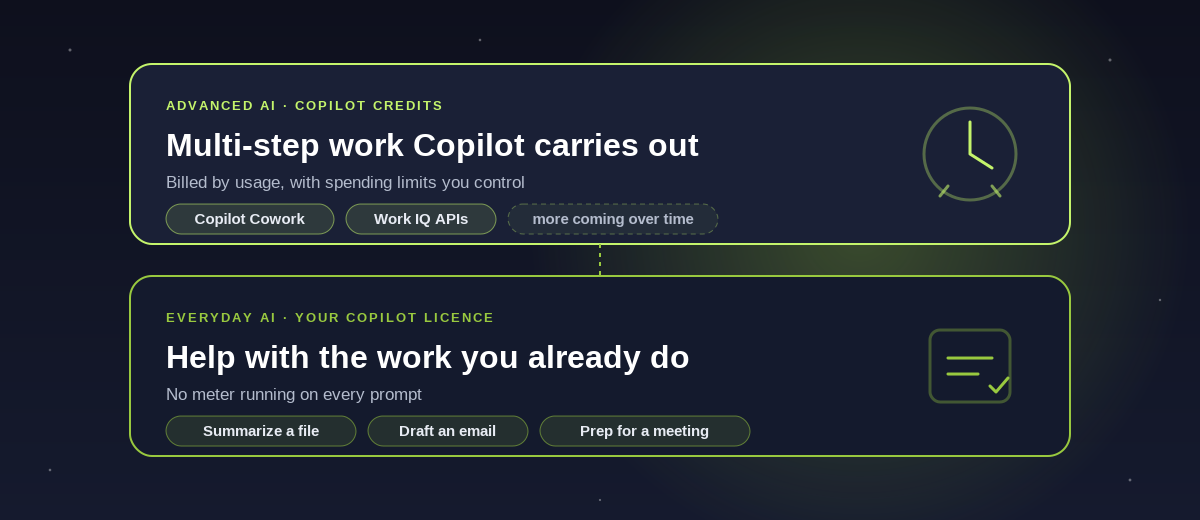
Copilot Credits, usage-based billing and the new January–March 2027 date: what’s changing in Microsoft Copilot and what your business should do now.
November 24, 2026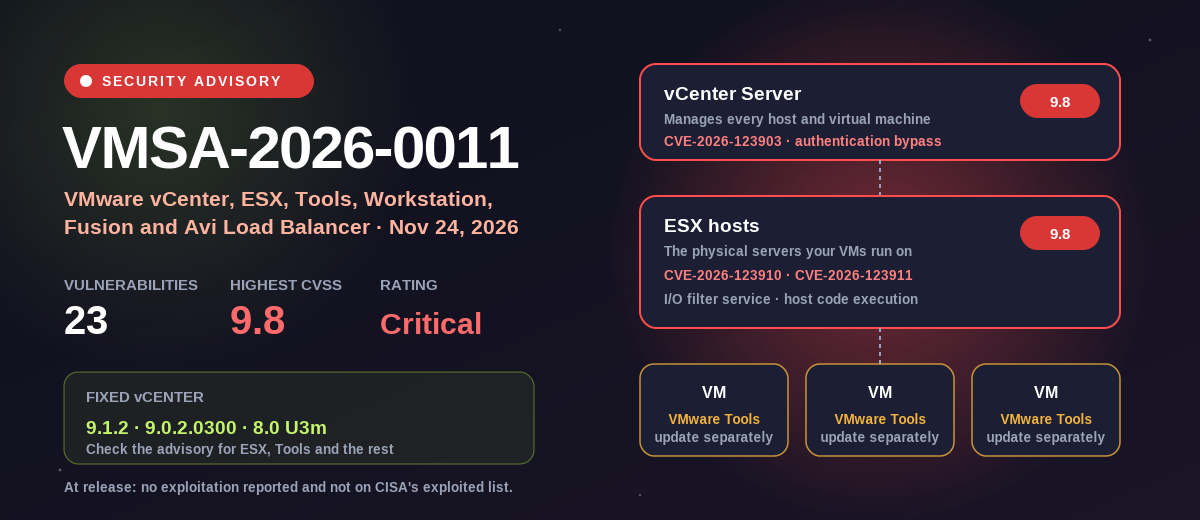
Broadcom fixed 23 VMware flaws on Nov 24, three rated 9.8 in vCenter and ESX. What it means for your servers, the fixed versions and what to do now.
November 25, 2026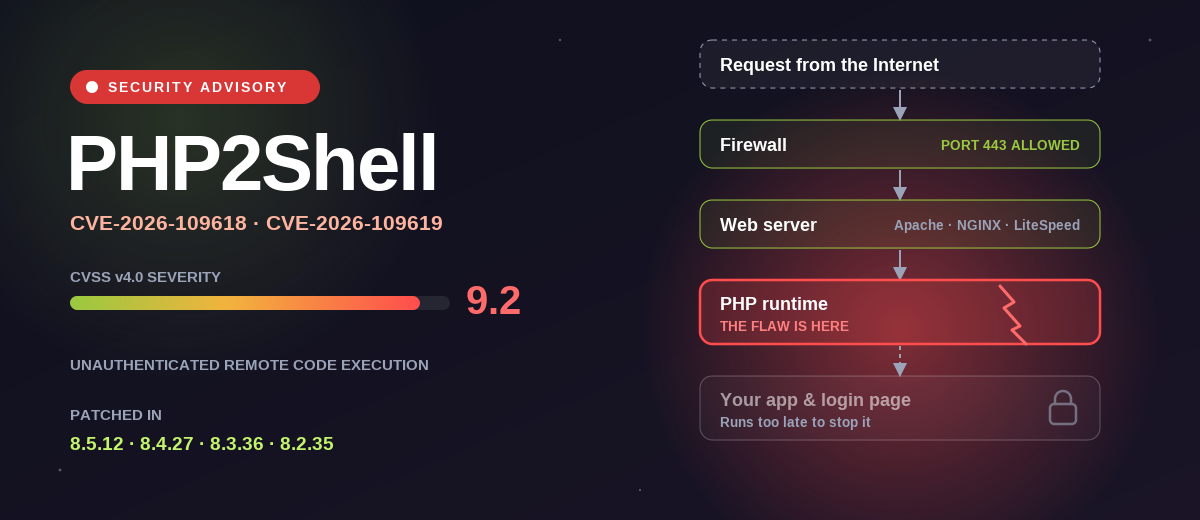
PHP2Shell (CVE-2026-109618, CVE-2026-109619) lets attackers run code on PHP servers without a login. What it means, fixed versions and what to do now.
October 21, 2026