
Text Message Login Codes Are Going Away: Here's What Microsoft 365 Users Need to Know
Microsoft will retire SMS and voice sign-in codes in 2027. What it means for your business, why passkeys replace them, and how to prepare.
August 26, 2026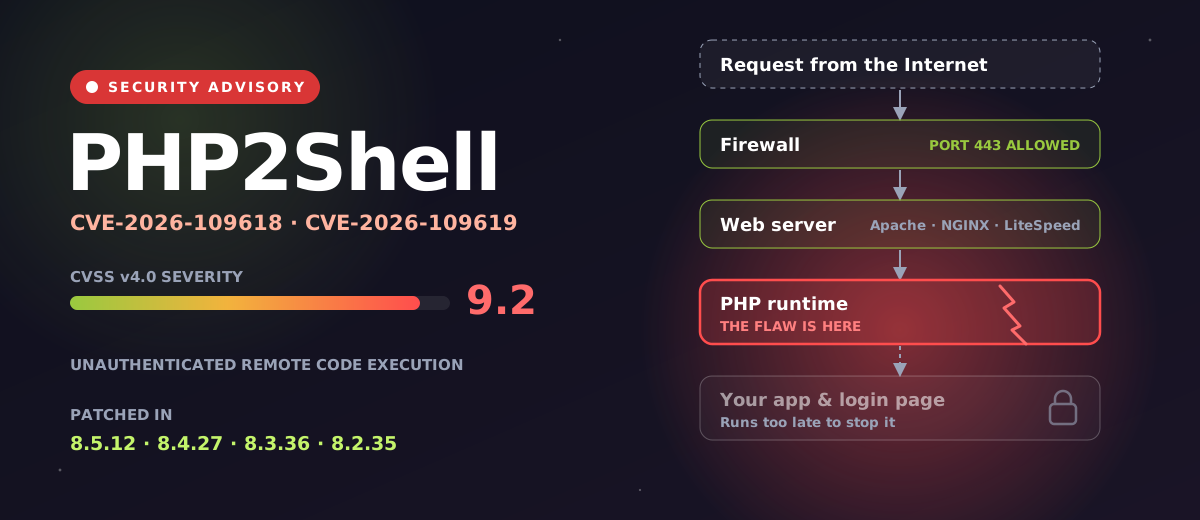
On October 21, 2026, a significant cybersecurity threat was disclosed in PHP, one of the most widely used technologies behind websites and web applications.
The two vulnerabilities, collectively called PHP2Shell, are tracked as CVE-2026-109618 and CVE-2026-109619. Both carry a CVSS v4.0 severity score of 9.2 out of 10, and both can potentially let an attacker who has never logged in run code on a vulnerable web server.
Before getting into the technical details, here's what that actually means for the average business.
If terms like PHP, remote code execution, CVEs and web application firewalls don't mean much to you, don't worry. The important part is much simpler.
PHP is technology that runs behind millions of websites and online applications. Your company may be using it without anyone realizing. Websites, customer portals, online stores, content management systems and many other web applications rely on PHP behind the scenes.
PHP2Shell is particularly concerning because it could let an attacker on the Internet take control of a vulnerable web server without first needing a username or password.
That does not mean every website running PHP has been hacked. It does mean you should have your IT department, managed service provider, web developer or hosting company confirm whether you run affected PHP systems and, if you do, whether they've been patched.
You don't need to understand how PHP2Shell works. You just need someone responsible for your technology to answer four questions:
Do we have any servers, websites or applications running PHP?
Are any of them reachable from the Internet?
Have they been updated or patched against PHP2Shell?
Have we checked them for signs of attempted or successful attacks?
This isn't one for next month's maintenance list. Amazon Threat Intelligence reported exploitation attempts as early as October 17, four days before the flaws were made public, and security researchers now report active exploitation and broad, untargeted scanning.
Amazon's honeypot sensors see PHP2Shell exploit attempts, four days before anyone announces the flaws.
Cloudflare switches on WAF protection for all plans with its WAF, including Free, about 9 hours before disclosure.
PHP publishes fixes. The Canadian Centre for Cyber Security issues alert AL26-026. Proof-of-concept code is public.
Reports of active exploitation and broad, untargeted scanning. Cloudflare sees attackers changing payloads to get around protections.
If an outside IT provider or hosting company looks after your website, the first step can be as simple as asking them today:
"Do any of our websites or servers use PHP, and have you confirmed that they are protected against CVE-2026-109618 and CVE-2026-109619?"
If they can answer confidently, great. If they can't, it's worth digging in. If you're a Reality Bytes client and want that confirmation for your own systems, just ask us.
For IT professionals, system administrators and website operators, here's what you need to know.
The Canadian Centre for Cyber Security describes CVE-2026-109618 and CVE-2026-109619 as use-after-free vulnerabilities (CWE-416) in PHP. Successful exploitation can let an unauthenticated attacker execute arbitrary code on the affected system. In practical terms, an attacker may not need:
That last one matters. The flaws live inside the PHP runtime itself, not in your website's code. Datadog Security Labs notes that application-level authentication can't block the attack, because PHP processes the malicious request before your application's code runs. The picture at the top of this post shows the path: the request passes the firewall on the normal HTTPS port, reaches PHP, and the damage happens before your login page is even involved.
This is much broader than WordPress. The Cyber Centre says all PHP installations serving web requests are at risk, including:
PHP's own assessment is that mod_php carries the greatest risk. Internet-facing servers are at heightened risk.
So check more than your main website. Look at:
You're looking for PHP, not just WordPress. Updating WordPress doesn't patch the PHP underneath it.
Security updates are out. If you run a supported PHP branch, upgrade to at least:
Fixed versions from the Canadian Centre for Cyber Security alert AL26-026. Any later release on the same branch is also fine.
PHP 8.1 and older are outside the PHP project's support. Some Linux distributions and long-term-support vendors backport security fixes, so an old-looking version number doesn't automatically mean a distribution package is vulnerable. Check the package's security status with your operating system or package vendor rather than relying on what php -v prints.
Treat PHP2Shell as an emergency patching and investigation event, especially for Internet-facing systems.
Start with an inventory. On Linux:
php -vDon't stop there. A server can have several PHP versions installed, and the command-line PHP may not be the runtime Apache, NGINX, PHP-FPM, an individual virtual host or a container actually uses. List the installed packages too:
# Debian and Ubuntu
dpkg -l | grep -i php

# RHEL family
rpm -qa | grep -i php
Then look beyond your servers: Docker containers, virtual machines, Kubernetes workloads, hosting control panels, hosting platforms, old servers, development infrastructure and vendor appliances. You're after the PHP runtime that actually processes web requests, not just whether a PHP package exists.
Prioritize public websites, customer portals, online stores, Internet-facing management interfaces, external web applications, development and staging servers, and internal web apps. A system doesn't need a public IP address to be Internet-facing: a PHP app behind a reverse proxy, load balancer or WAF still receives requests that started on the Internet.
Install the fixed PHP release, or your Linux distribution's security packages for supported branches. The Cyber Centre recommends updating immediately, starting with Internet-facing systems and applications that process untrusted input. Restart PHP-FPM or the web server afterwards so the new runtime is actually the one serving requests.
Fixes your website's code. Leaves the PHP runtime underneath exactly as it was.
Your WordPress can be completely current while the PHP running it is still vulnerable.
A traditional network firewall is essential, but it won't necessarily stop PHP2Shell. Public websites have to accept HTTPS on TCP port 443, and the attack can arrive through that same legitimate connection.
A web application firewall (WAF) adds a layer here. Cloudflare reports it deployed PHP2Shell protections about nine hours before disclosure, automatically on every plan with its WAF, including Free, and saw attackers changing their payloads to get around them. Cloudflare is also clear that customers should patch PHP even with the WAF protections in place.
A WAF is defence in depth. It is not a substitute for installing the update.
The update protects the server from future exploitation of these flaws. It doesn't tell you whether the server was attacked before you installed it. With attempts seen as early as October 17, review server activity back to at least that date. Depending on your environment, start with:
/var/log/apache2/access.log
/var/log/apache2/error.log

/var/log/nginx/access.log
/var/log/nginx/error.log
Then check PHP-FPM logs, WAF and reverse-proxy logs, Cloudflare security events, EDR telemetry, Linux authentication logs, process execution history, container logs, SIEM alerts and outbound network activity.
Datadog Security Labs suggests looking for unusually large form submissions, memory-exhaustion errors during request start-up (before any script runs), and shell processes started by PHP or the web server. Pay particular attention to a web-server or PHP process launching:
All of these have legitimate admin uses, so their presence alone doesn't prove a compromise. The real question is why a public-facing PHP process started them, and what happened next.
Servers shouldn't be invisible to your security monitoring. Where technically appropriate, Internet-facing servers should run an endpoint detection and response (EDR) platform such as Bitdefender GravityZone, Microsoft Defender for Endpoint, CrowdStrike Falcon, SentinelOne or Huntress. Not sure how EDR differs from antivirus? We covered that in antivirus vs EDR and MDR.
EDR is especially useful here because it records the process tree, the chain of which program started which:
A chain like this deserves immediate investigation.
If you use Microsoft Sentinel or another SIEM, correlate server logs, WAF events, endpoint detections and network activity rather than treating each tool on its own.
If a vulnerable PHP system can't be patched right away, seriously consider isolating it from the Internet until it can be. The Cyber Centre recommends considering exactly that for Internet-facing applications, and CERT-EU gives the same advice.
Be careful with unofficial workarounds circulating online. Datadog warns that disabling session.upload_progress does not fully protect a system. A maintenance-mode plugin doesn't help either, because it runs on the same vulnerable PHP. The permanent fix is patching the PHP runtime.
Contact them. Don't assume the infrastructure has been updated. Ask specifically:
"Can you confirm whether the infrastructure hosting our website was affected by CVE-2026-109618 or CVE-2026-109619, and whether the PHP runtime serving our website has been patched or confirmed not vulnerable?"
The distinction matters because your host may manage PHP separately from your website's content management system.
That's good. Cloudflare deployed PHP2Shell mitigations ahead of disclosure for customers using its WAF. Just don't let it become a reason to delay patching. Every extra layer an attacker has to defeat helps, and the most important layer is a patched PHP.
Everyone remembers the main company website. It's much easier to forget the others:
www.company.caThis weekoldwebsite.company.caForgotten?portal.company.caForgotten?dev.company.caForgotten?staging.company.caForgotten?webmail.company.caForgotten?legacy.company.caForgotten?app.company.caForgotten?A website nobody has touched in three years can be a bigger risk than your main one, precisely because nobody is maintaining it. Review DNS records, reverse proxies, firewall rules, hosting accounts and server inventories for anything that's been forgotten.
Amazon saw exploitation attempts days before disclosure, and public proof-of-concept code appeared around the time the patches did. For critical flaws in Internet-facing systems, the window between "announced" and "attacked" is now measured in hours, not the seven- or 30-day patch cycles many organizations still plan around.
That lesson goes well beyond PHP.
If you run websites or web applications, your internal IT team or IT provider should be able to answer every one of these. Tick them off as you go.
If some of the answers are "we don't know," now is a very good time to find out.
PHP2Shell should be taken seriously. It can allow unauthenticated remote code execution, proof-of-concept code is public, and exploitation attempts have already been seen. The good news is that fixes are available, and the response doesn't need to be complicated:
Most importantly, don't assume everything is fine because your website looks normal. A successful attack on a web server doesn't necessarily cause an outage or a defaced home page.
If your organization runs Internet-facing PHP, don't leave this for the next maintenance window. If you'd like a hand finding and patching it, or checking your logs, our cybersecurity team can help. Talk to us.

Microsoft will retire SMS and voice sign-in codes in 2027. What it means for your business, why passkeys replace them, and how to prepare.
August 26, 2026
Canada’s new privacy law, Bill C-36, is coming. Learn what it means, what’s changing, and how your business can prepare.
June 30, 2026
You know Wi-Fi. You use it every day. Your business runs on it. But should you upgrade to Wi-Fi 7? Read on and find out.
April 22, 2026