
The Bell Cyber Breach: What Was Taken, and What Alberta Organizations Should Do Now
Bell says an "agentic" attacker took customer contact and account details on Nov 17. Why the real risk is convincing scams, and what to do now.
November 25, 2026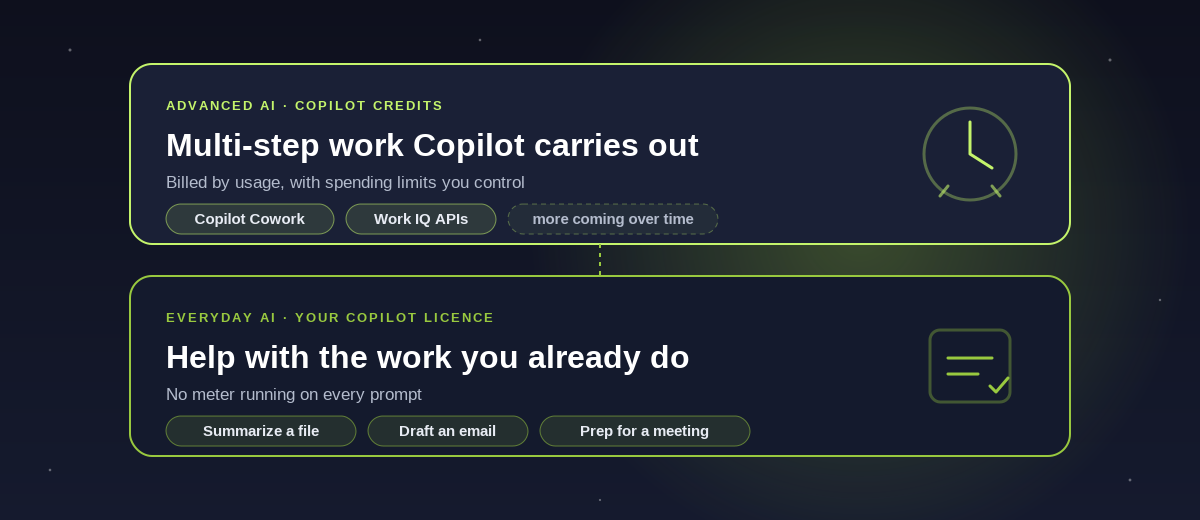
If you’ve been trying to keep up with Microsoft Copilot lately, you may have noticed something: it’s changing quickly.
Microsoft has been introducing new Copilot experiences, new ways to purchase it, Copilot Credits, usage-based billing, and increasingly powerful AI that can take on more complicated work. Even Microsoft’s timeline is changing.
Microsoft originally planned to automatically enable usage-based billing for new Microsoft 365 Copilot Business purchases through Cloud Solution Provider partners starting December 1, 2026. That rollout has now been pushed back, with Microsoft saying it plans to begin during its third fiscal quarter, between January and March 2027.
If that makes the whole thing sound even more confusing, don’t worry.
The important part isn’t the date. It’s understanding where Copilot is going and what that means for your business.
So, let’s make some sense of it.
This is probably the most important misconception to clear up. Microsoft isn’t simply replacing your Copilot subscription with a meter.
Instead, Microsoft is moving toward a model that combines fixed subscription licensing with usage-based billing for certain advanced AI experiences. Microsoft calls the units used for eligible usage-based services Copilot Credits.
An easier way to think about it is:
The Copilot work you regularly use as part of your licensed experience. For example, asking Copilot to summarize a document or help you draft an email.
More complex or longer-running AI work that may consume Copilot Credits based on usage. For example, using Copilot Cowork to carry out a multi-step task that gathers information, works across files and apps, and delivers a finished result.
A Cowork-style task could be:
“Catch me up on Project X using the recent emails, Teams conversations, meetings, and files. Create a Word document summarizing where the project stands, identify the outstanding items, and draft a follow-up email to the team.”
Now Copilot has several pieces of work to do: find the relevant information, bring it together, analyze it, create the document, and prepare the follow-up communication, and that’s stepping into advanced AI territory.
So, no, you don’t need to imagine a little meter running every time someone asks Copilot to help write an email or summarize something. Usage-based billing is becoming another layer for more advanced AI work.
Microsoft had planned to have usage-based billing enabled by default with new Microsoft 365 Copilot Business purchases beginning December 1. That’s no longer happening on December 1. The current plan is to begin rolling out the change sometime between January and March 2027.
There’s an important word in that explanation: default.
Microsoft hasn’t abandoned usage-based Copilot. Advanced experiences such as Copilot Cowork and Work IQ APIs are part of Microsoft’s consumption model, and Microsoft expects more usage-based agents and services to be added over time.
What’s been delayed is the plan to have that usage-based billing infrastructure automatically enabled by default when new Copilot Business licences are purchased through CSP. For businesses, that gives us a little more breathing room.
And honestly, we think that’s a good thing.
AI shouldn’t be something you turn on everywhere just because a new feature becomes available. This gives businesses more time to understand what these tools can do, where they might actually help, and how access and spending should be managed.
Think about why someone in your business might use Copilot in the first place. Maybe you need help getting started on a document instead of staring at a blank page. Maybe you have a lot of information to sort through and need to find the important bits. Or maybe you’re preparing for a meeting and need help getting up to speed.
Perhaps you simply need to find something that you know someone sent you, but you can’t remember whether it was in an email, file, or Teams conversation.
These are the kinds of everyday problems where Copilot can become useful, and we think that’s where most businesses should start. You don’t have to transform your whole organization with AI next Tuesday.
Start by finding one annoying task that keeps eating up your time. Then ask: Could Copilot help with part of this?
That’s much more useful than simply asking, “How do we use more AI?”
This is a fair question. There are plenty of AI tools available, including free versions of services like ChatGPT. So why would a business pay for Microsoft Copilot?
For organizations already working in Microsoft 365, one of the biggest differences is context. Microsoft Copilot is designed to work with your Microsoft environment and the information you already have permission to access.
That allows AI to become part of the places where work is already happening, rather than always starting with a blank chatbot and manually finding, copying, uploading, or explaining the information it needs.
For example, think about asking, “Help me prepare for this meeting.”
A standalone AI chat might need you to explain which meeting you mean and provide the relevant background. A business AI tool that can work with the context you’re already authorized to access has the potential to make that process much more useful.
That’s why we don’t think businesses should choose an AI platform based only on which chatbot gives the cleverest answer to a random prompt.
The better question is which AI fits the way your business actually works.
There’s another important consideration when employees start using AI for work: what happens to your business information?
That’s one of the reasons we draw a distinction between casually experimenting with consumer AI tools and adopting AI as part of your business environment. Microsoft applies enterprise data protection to Microsoft 365 Copilot, and Copilot only works with information each person already has permission to see, while your existing Microsoft 365 permissions and administrative controls continue to matter.
There is a catch worth remembering, though.
Copilot doesn’t fix bad permissions.
If someone already has access to information they probably shouldn’t, adding AI doesn’t magically fix the underlying sharing problem. In fact, AI makes good Microsoft 365 housekeeping even more important.
Before expanding Copilot across your business, it’s worth reviewing:
That’s part of what we mean when we talk about Copilot readiness. It isn’t just about whether your computers can run it. It’s about whether your business is ready to use it well.
Here’s another interesting part of where Microsoft is heading. It’s tempting to think about workplace AI as a competition between Copilot vs. ChatGPT vs. Claude, but that’s becoming an overly simple way to look at it.
Microsoft is increasingly making Copilot a place where different AI technologies can be used for different work. OpenAI models remain an important part of Copilot, while Microsoft has also been adding support for Anthropic’s Claude models in supported Copilot experiences.
That doesn’t mean every prompt you send to Copilot automatically bounces between GPT and Claude looking for the best answer. Rather, it points toward a future where organizations have more choice over which AI models and capabilities they use for particular jobs.
For businesses, the question may eventually become less “Which AI did we choose?” and more “Which AI is best suited to this particular job?”
That may ultimately be much more useful.
This is where Microsoft’s usage-based model starts to make more sense.
The first wave of workplace AI has largely focused on assistance: ask a question, create a draft, summarize something, find information, or analyze something. Newer AI experiences are starting to move from assisting with work toward taking on more complex work.
Copilot Cowork, for example, is one of the advanced services listed under Microsoft’s usage-based model. Microsoft’s current model also includes services such as Work IQ APIs, with additional services expected over time.
That’s where Copilot Credits begin to make more sense. Instead of assuming that every Copilot prompt is going to cost extra, think of your regular Copilot licence as covering your everyday use, while certain advanced AI experiences may have an additional usage cost.
That’s a very different thing.
Yes. Usage-based AI doesn’t have to mean opening the door and hoping the bill isn’t surprising next month.
Microsoft’s model includes spending policies and management controls around advanced consumption. Its current guidance also says partners retain visibility and control over spending limits when the model is enabled through CSP.
As AI starts taking on more complicated work, cost management will become part of responsible AI management. Businesses will increasingly need to decide who should have access to advanced AI, what kinds of work it should be used for, and how much usage makes sense.
Most importantly, they’ll need to ask whether that usage is actually creating enough value to justify the cost.
Just because AI can do something doesn’t automatically mean it should.
Honestly? Don’t rush.
Microsoft’s decision to delay automatically enabling usage-based billing gives businesses a little more time to understand where Copilot is going. Use that time wisely.
Instead of starting with “How much Copilot should we buy?”, start with “Where could Copilot actually make work better?”
Look at how your team works today. Where are people spending too much time on repetitive tasks? What information is frustrating to find? Where does work regularly get stuck? Which jobs involve a lot of searching, reading, drafting, collecting, comparing, or organizing?
Those questions will tell you far more about your Copilot needs than a feature list will.
And if you get to this point and think, “Honestly, I have no idea where we’d even start,” that’s something Reality Bytes can help with. It’s part of our AI for Business work.
We can assess how your team works, identify places where Copilot could realistically help, look at whether your Microsoft 365 environment is ready, and narrow everything down to a few use cases that are actually worth testing.
The answer might be rolling out Copilot to a whole team. It might be starting with three people. It might be cleaning up some Microsoft 365 permissions first.
Sometimes, the answer might even be: “AI probably isn’t the best solution to this particular problem.”
That’s useful information too.
You don’t need to buy anything to start thinking about this. Ask yourself, or your team: “What is one task you do every week that takes longer than it should?”
Don’t ask where people want AI. Just ask about the annoying work, then write down the answers.
Maybe people spend too much time searching for information. Maybe getting started on documents takes forever. Maybe meeting follow-up is inconsistent. Maybe several people are doing almost the same repetitive work. Or maybe you uncover a process that doesn’t need AI at all and could be fixed another way.
Either way, you’ve learned something.
Then look at the list and ask: “Could Copilot make any part of this easier?”
If the list gets long, or you’re having trouble figuring out which problems are actually good Copilot candidates, bring it to us. A big part of a Copilot assessment is separating the opportunities that are worth exploring from the ones that probably aren’t.
Microsoft Copilot is evolving quickly. Products will change, AI models will change, new features will appear, billing models will evolve, and, as we’ve just seen, rollout dates can move too. Microsoft’s current guidance has shifted the automatic usage-based billing rollout for new Copilot Business CSP purchases from December 1 into the January–March 2027 period.
Your business doesn’t need to reinvent its AI strategy every time Microsoft announces another change.
You need a much simpler foundation: What work are we trying to make better?
From there, you can figure out which Copilot tools make sense, who should use them, what needs to be secured, how you’ll know whether they’re helping, and whether they’re worth expanding. Reality Bytes can help you work through that assessment if you’re not sure where to begin.
But whether you tackle it with us or start on your own, we’d give you the same advice: start with the work, not the AI.
One useful improvement is worth a lot more than 100 AI features nobody actually needs.
Reality Bytes helps partner organizations decide where Copilot is worth it, get Microsoft 365 permissions and sharing in order first, and set sensible limits on advanced AI. Our IT consulting and vCIO teams can fit it into your wider technology plan.
Talk to Reality Bytes about Copilot
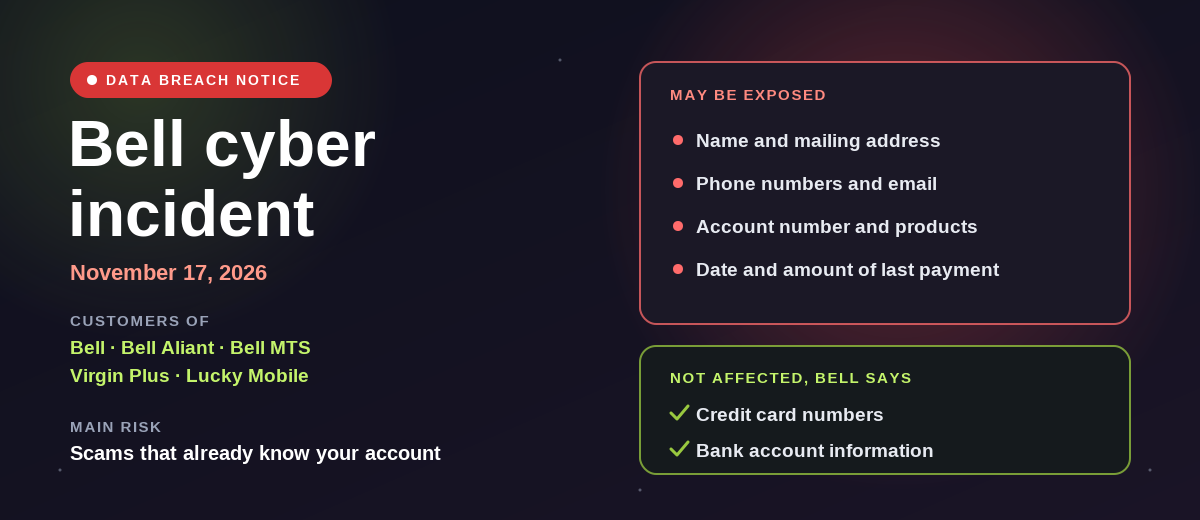
Bell says an "agentic" attacker took customer contact and account details on Nov 17. Why the real risk is convincing scams, and what to do now.
November 25, 2026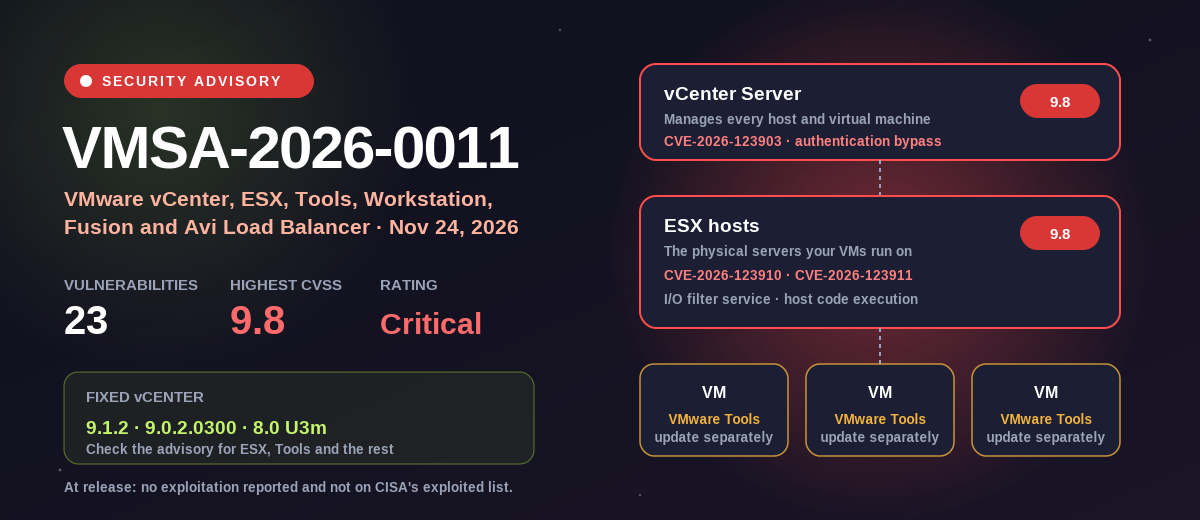
Broadcom fixed 23 VMware flaws on Nov 24, three rated 9.8 in vCenter and ESX. What it means for your servers, the fixed versions and what to do now.
November 25, 2026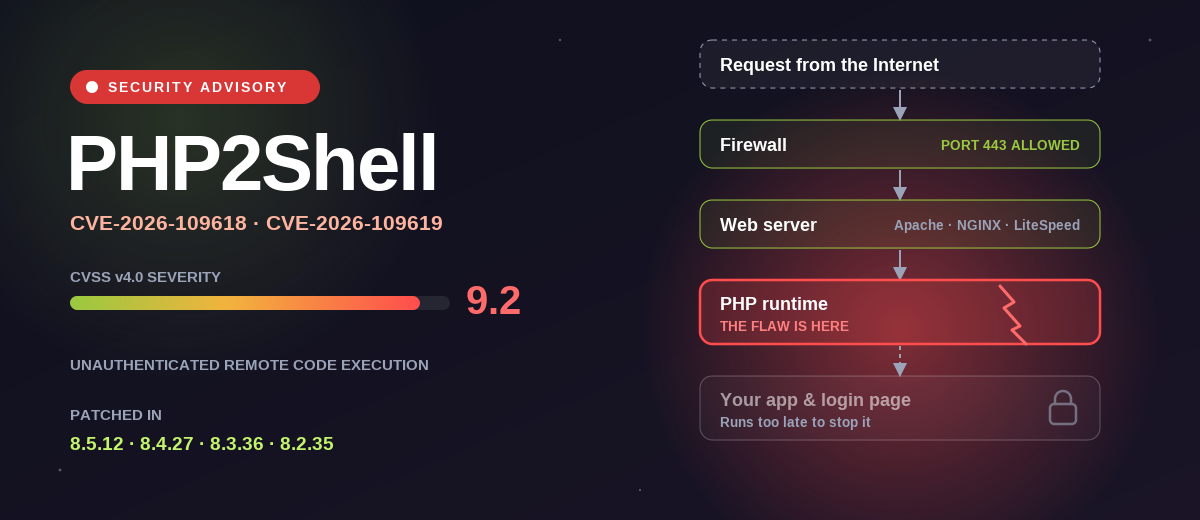
PHP2Shell (CVE-2026-109618, CVE-2026-109619) lets attackers run code on PHP servers without a login. What it means, fixed versions and what to do now.
October 21, 2026