
The Bell Cyber Breach: What Was Taken, and What Alberta Organizations Should Do Now
Bell says an "agentic" attacker took customer contact and account details on Nov 17. Why the real risk is convincing scams, and what to do now.
November 25, 2026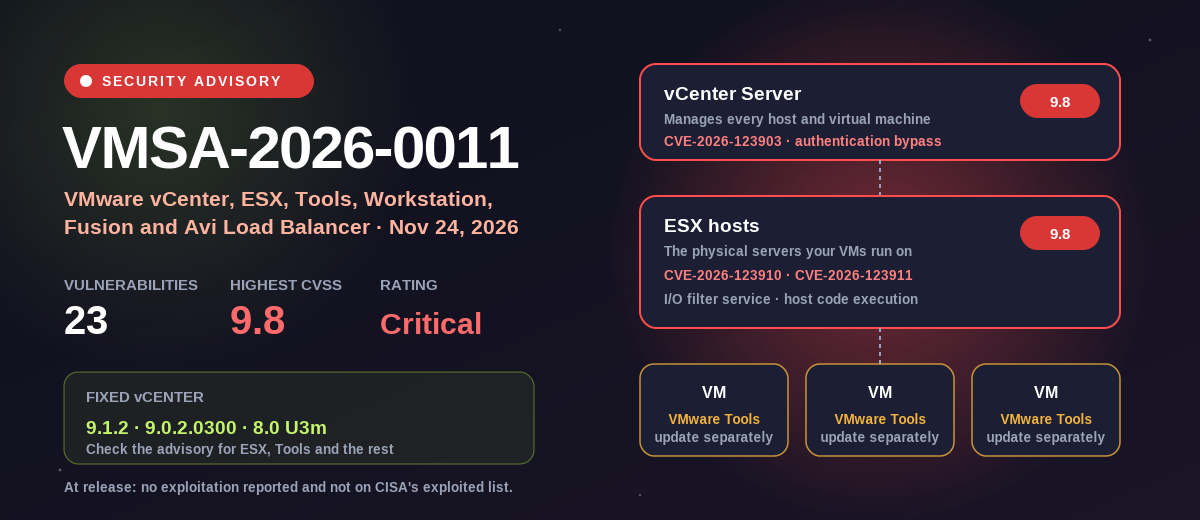
On November 24, 2026, Broadcom published VMSA-2026-0011, a critical security advisory covering 23 vulnerabilities in VMware vCenter, ESX, VMware Tools, Workstation, Fusion and Avi Load Balancer. The Canadian Centre for Cyber Security followed the same day with advisory AV26-1203, encouraging administrators to apply the updates.
Three of the flaws score 9.8 out of 10: an authentication bypass in vCenter (CVE-2026-123903) and two flaws in ESX (CVE-2026-123910 and CVE-2026-123911) that can let an attacker with network access run code on the host itself.
The timing makes this one hard to ignore. Only five days earlier, Broadcom patched a different vCenter authentication bypass, CVE-2026-123890, that attackers had already been exploiting since September. If you patched for that one last week, you still need to patch again.
If your organization has its own servers in an office or a data centre, there's a good chance they run on VMware vSphere. It's the software that lets one physical server run many "virtual" servers: your file server, accounting system, domain controller, line-of-business apps and more.
Where your IT team manages every host and every virtual server. Anyone who gets into vCenter can reach all of them.
The machines your virtual servers actually run on. Take over one, and every virtual server on it is exposed.
That's why these flaws matter. They're not in one application; they're in the layer underneath your applications. A successful attack here could give someone the keys to every server at once, and encrypting a single host can take every server on it offline together.
This doesn't mean anyone running VMware has been attacked. At the time of release, no exploitation of the VMSA-2026-0011 flaws had been reported. It does mean whoever looks after your servers should be planning these updates now, not at the next quarterly maintenance window. Ask them four questions:
Do we run VMware vCenter or ESX anywhere, including at a hosting provider or a vendor's appliance?
Did we install last week's vCenter fix for CVE-2026-123890?
When will vCenter, every ESX host and VMware Tools be updated for VMSA-2026-0011?
Can vCenter and ESX management be reached only from a protected management network?
If an outside IT provider looks after your servers, the first step can be as simple as asking them:
"Do we use VMware vCenter or ESX, and when will our systems be updated for VMSA-2026-0011, including VMware Tools inside our virtual machines?"
If you're a Reality Bytes partner organization and want that confirmation for your own systems, just ask us.
For IT professionals and system administrators, here's what you need to know.
Google and Mandiant report attackers exploiting CVE-2026-123890, a vCenter authentication bypass, as a zero-day. Mandiant links the activity to a China-nexus group it tracks as ARMORY CASTLE.
Broadcom publishes VMSA-2026-0009 and fixes CVE-2026-123890 (CVSS 9.8). The Canadian Centre for Cyber Security issues advisory AV26-1185.
CISA adds CVE-2026-123890 to its Known Exploited Vulnerabilities catalog and gives U.S. federal agencies until November 23 to fix it.
Broadcom publishes VMSA-2026-0011: 23 vulnerabilities, including a new vCenter authentication bypass (CVE-2026-123903) and two ESX code execution flaws. The Cyber Centre issues AV26-1203.
No reported exploitation of the VMSA-2026-0011 flaws, and none are on CISA's exploited list. That can change quickly once researchers start comparing patched and unpatched builds.
Broadcom is clear that CVE-2026-123903 is a new and distinct issue, not a re-release of last week's fix. Both flaws live in the same vCenter component, the VMware Directory Service, and both let an attacker who can reach vCenter over the network skip authentication.
Closes CVE-2026-123890 (VMSA-2026-0009). Does not close CVE-2026-123903.
The fixed releases Broadcom lists for VMSA-2026-0011 on the 9.x branches.
VMware's own Q&A for the advisory says running 9.1.1 does not protect you from the VMSA-2026-0011 issues (only one of the 23, CVE-2026-123916, was already resolved there). On vCenter 8.0, Broadcom lists 8.0 U3m as the fixed release in both advisories: confirm your build matches the response matrix.
The advisory is rated Critical overall, with individual scores from 3.4 to 9.8. Broadcom lists four issues as critical:
| CVE | Product | What it is | CVSS |
|---|---|---|---|
| CVE-2026-123903 | vCenter | Authentication bypass in the VMware Directory Service. Network access to vCenter is enough. | 9.8 |
| CVE-2026-123910 | ESX | Flaw in the ESX I/O filter service that can lead to code execution on the host. | 9.8 |
| CVE-2026-123911 | ESX | Heap out-of-bounds write in the same I/O filter service. Network access to ESX may let an attacker run code on the host. | 9.8 |
| CVE-2026-123912 | Workstation, Fusion, ESX | Out-of-bounds write in the virtual XHCI USB controller. Scored lower on ESX, where the impact is contained in the VMX sandbox. | 9.3 (8.5 on ESX) |
The rest include an arbitrary file write in vCenter (CVE-2026-123904) that could lead to code execution on the vCenter appliance, a denial-of-service issue in guest RPC affecting ESX, Workstation and Fusion (CVE-2026-123916), and fixes for VMware Tools and Avi Load Balancer. Broadcom's advisory has the full list of 23.
These are the fixed releases in Broadcom's response matrix as of November 25. Always check the matrix itself before you patch, because Broadcom revises advisories as it learns more.
| Product | Version you run | Update to |
|---|---|---|
| vCenter | 9.1.x | 9.1.2 |
| 9.0.x | 9.0.2.0300 | |
| 8.0 | 8.0 U3m | |
| VMware Cloud Foundation 5.x | 5.2.5 (asynchronous patching, KB 88287) | |
| 7.0 | Affected; fixes only through Broadcom extended support | |
| ESX | 9.1.x | ESXi-9.1.2.0-25946735 |
| 9.0.x | ESXi-9.0.2.0200-25953133 | |
| 8.0 | ESXi80U3m-25926933 (8.0 U3m) | |
| 7.0 | Contact Broadcom Support (extended support contracts) | |
| VMware Tools | 13.x | 13.1.10 |
| 12.x and 11.x | 12.5.6 | |
| Workstation & Fusion | All supported | 26H1u1 |
| Avi Load Balancer | All supported | See the advisory for your release |
Running vSphere 6.5 or 6.7? Broadcom doesn't evaluate products past the end of general support, so assume they're affected with no fix coming. That's a strong signal it's time to plan a move to a supported platform.
Check the vCenter build in the vSphere Client (or the appliance management interface on port 5480), and on each host:
esxcli system version getDon't forget the less obvious ones: a lab or test cluster, a standalone ESX host in a branch office, a disaster recovery site, and vendor appliances that bundle vCenter. VMware Cloud Foundation and Telco Cloud customers should follow Broadcom's product-specific guidance for those platforms.
Both 9.8 vCenter bypasses this month need nothing more than network access to vCenter. vCenter and ESX management interfaces should never face the Internet, and ideally sit on a separate management network that only administrators can reach, through a VPN with multi-factor authentication. That won't fix the flaws, but it shrinks the list of people who can try them.
Take a file-based backup of vCenter (and confirm your virtual machine backups are current) before you start. Broadcom's Q&A also notes that while vCenter is offline for the update, some encryption operations that rely on a Standard Key Provider aren't available; existing encrypted workloads, vSphere HA and vSAN keep running.
Update vCenter to the fixed release for your branch. If you skipped last week's VMSA-2026-0009 update, this gets you both fixes in one go on 9.x.
Broadcom says these ESX updates are not eligible for ESX Live Patch, so plan for the usual routine: move virtual machines off with vMotion, put the host in maintenance mode, update, reboot, and repeat.
If you run ESXi 8.x and can't patch straight away, Broadcom's KB 463535 describes an interim workaround for CVE-2026-123910 and CVE-2026-123911. The vulnerable IOFilterVP service listens on port 9080, and the workaround limits that port so only your vCenter Server's IP address can reach it:
esxcli network firewall ruleset set -r iofiltervp --allowed-all false
esxcli network firewall ruleset allowedip add -r iofiltervp -i <vCenter-IP>
esxcli network firewall ruleset allowedip list -r iofiltervp
Follow the KB itself rather than copying commands from any blog, including this one. The workaround applies to ESXi 8.x only, Broadcom lists none for 9.x, and it doesn't cover the vCenter flaw. It buys time; it isn't the fix.
This step is easy to miss. Updating vCenter and ESX does not update VMware Tools inside your virtual machines. Each virtual machine needs its own Tools update (13.1.10, or 12.5.6 on the 12.x and 11.x lines). Also update VMware Workstation and Fusion to 26H1u1 on any admin or developer laptops that run them.
Patching protects you from future use of these flaws. It can't tell you whether someone got in before. There's no reported exploitation of VMSA-2026-0011 yet, but CVE-2026-123890 was exploited for weeks before its fix, and CISA's catalog marks forensic triage as required for it. If your vCenter was unpatched and reachable during that window, review vCenter and identity logs back to at least September for unexpected logins, new accounts or permission changes, and check EDR and network logs for unusual activity from the vCenter appliance. If anything looks off, treat it as an incident, not just a patch.
Plenty of organizations rent virtual servers from a hosting company or private cloud provider that runs VMware behind the scenes. In that case, the provider patches vCenter and ESX, but VMware Tools inside your virtual machines may still be your job. Ask:
"Is the platform hosting our servers affected by VMSA-2026-0011, when will it be patched, and do we need to update VMware Tools inside our virtual machines ourselves?"
If you run Microsoft Hyper-V, Azure or another platform with no VMware in the picture, this advisory doesn't apply to you, but it's still a good prompt to confirm your hypervisor updates are current.
VMSA-2026-0011 is serious: three 9.8 flaws in the software that runs your servers, arriving days after attackers were caught exploiting a similar vCenter bug. The good news is that fixes are out and the response is straightforward:
Don't assume everything is fine because your servers look normal. Attackers who get into a virtualization platform often stay quiet until they're ready to act.
If you'd like a hand checking your VMware environment, planning the updates or reviewing logs, our cybersecurity team can help. Partner organizations on managed IT services can raise it through the client portal, and if you're thinking about whether your virtual servers belong on-premises at all, our cloud solutions page is a good place to start. Want to make sure you could recover if the worst happened? Read about backup and recovery, or talk to us.
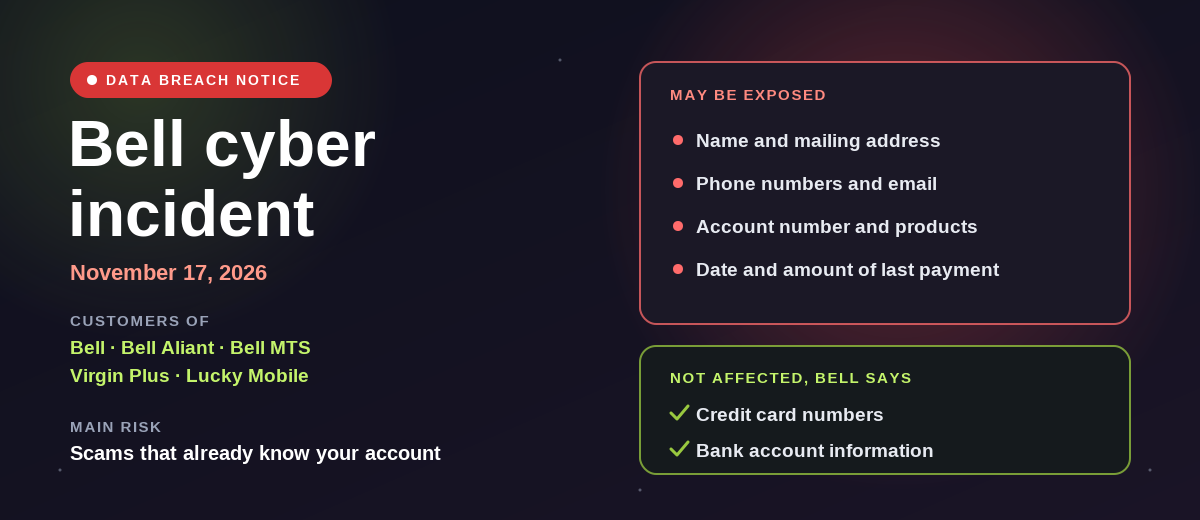
Bell says an "agentic" attacker took customer contact and account details on Nov 17. Why the real risk is convincing scams, and what to do now.
November 25, 2026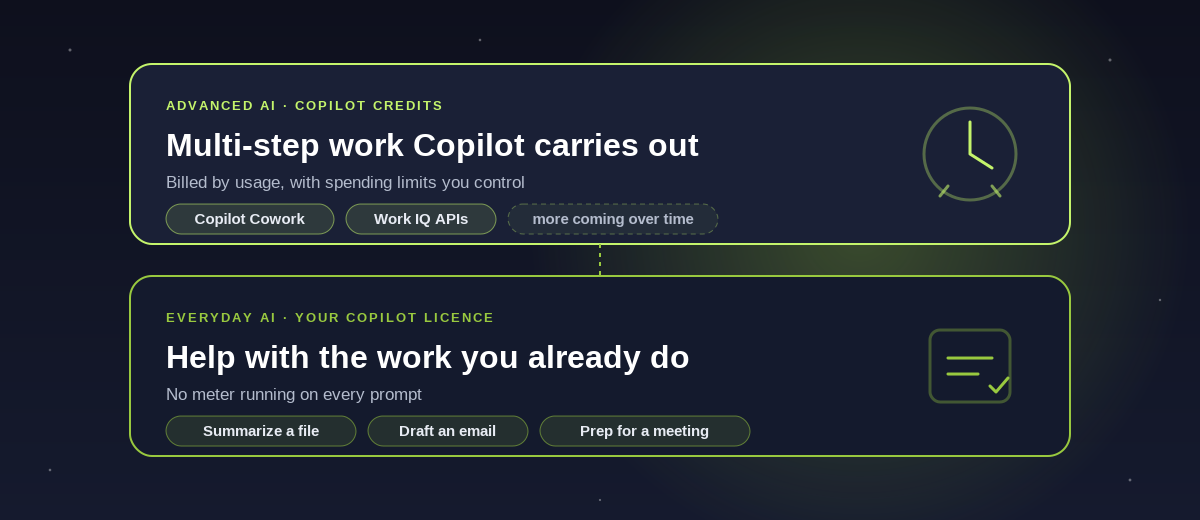
Copilot Credits, usage-based billing and the new January–March 2027 date: what’s changing in Microsoft Copilot and what your business should do now.
November 24, 2026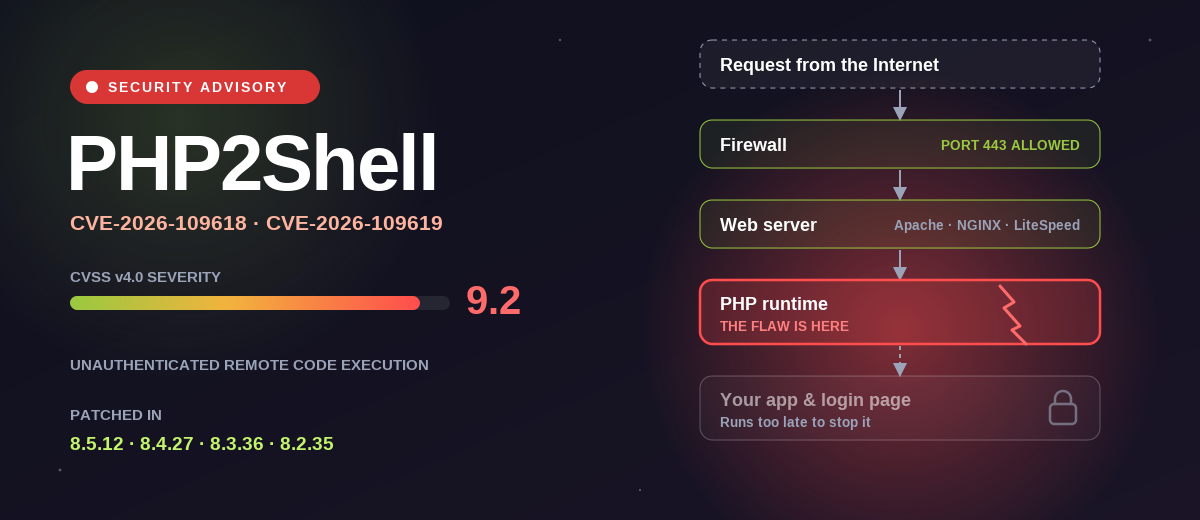
PHP2Shell (CVE-2026-109618, CVE-2026-109619) lets attackers run code on PHP servers without a login. What it means, fixed versions and what to do now.
October 21, 2026