
Why Are Hackers Sending Emails Using My Employees' Names?
Getting phishing emails that use your employees' real names? Learn how display-name impersonation works, how attackers find names, and why it rarely means a hack.
October 13, 2026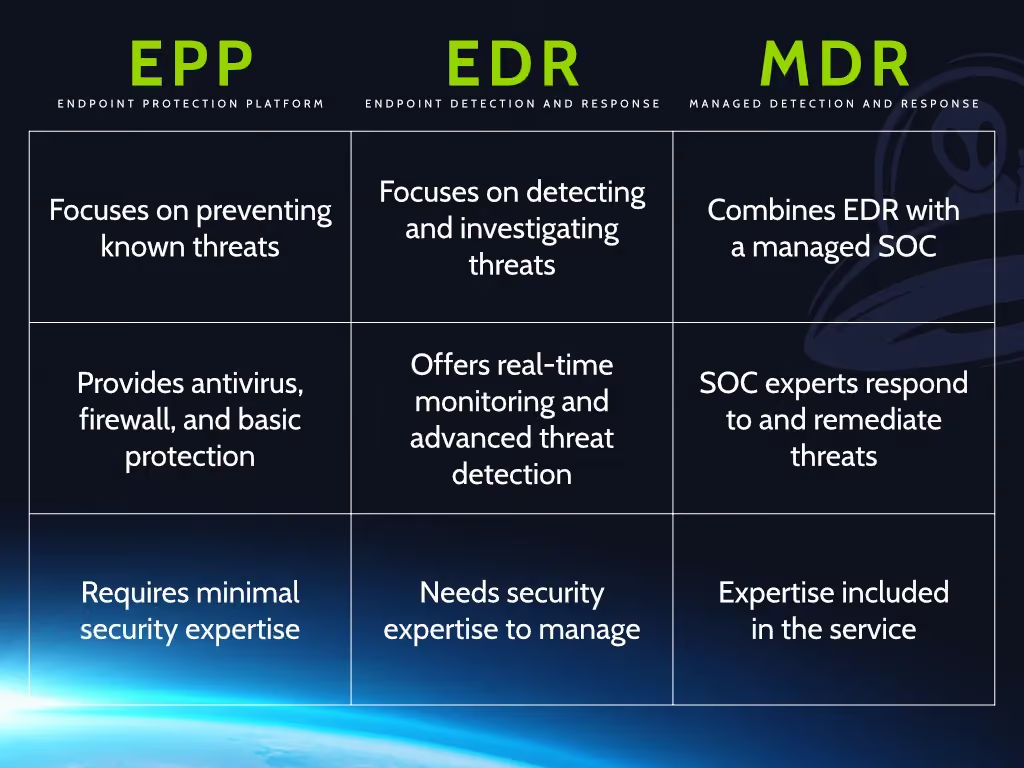
For twenty years, “we have antivirus” was a reasonable answer to the question “are your computers protected?”
It isn't anymore.
The attacks hitting Alberta businesses today don't look like the viruses antivirus was built to stop. They look like a legitimate sign-in from a stolen password, a built-in Windows tool being used in a way it was never meant to be used, or a quiet week of reconnaissance before ransomware is launched at 2 a.m. on a long weekend.
This post explains the difference between traditional antivirus, Endpoint Detection and Response (EDR), and Managed Detection and Response (MDR), and why the combination of the last two has become the baseline for any organization that can't afford a week of downtime.
Traditional antivirus works mostly by recognition. It keeps a list of known malicious files and patterns, scans what lands on the computer, and blocks anything on the list. Better products add some behaviour checks, but the core idea is the same: stop known bad things from running.
That still has value. Plenty of commodity malware is caught this way every day, and no one should run a business computer without it.
The problem is what antivirus doesn't see:
Most importantly, antivirus is a product, not a person. When it misses something, nobody is notified, nobody investigates, and the first sign of trouble is often the ransom note.
Endpoint Detection and Response is the next generation of endpoint security. Instead of only asking “is this file known to be bad?”, an EDR agent continuously records what is happening on each computer and server: which processes start, what they connect to, what they change, and how they relate to each other.
That changes what's possible:
Microsoft describes EDR capabilities as providing near real-time, actionable detections so security teams can prioritize and respond to threats effectively. That word, teams, matters. EDR generates detailed, sometimes constant, alerts. Somebody has to read them.
Managed Detection and Response is the service wrapped around the tooling. It is the people and process that make EDR useful for an organization that doesn't have its own security analysts.
With MDR:
Put simply: EDR is the smoke detector and the sprinklers. MDR is the fire department that actually shows up.
| Antivirus | EDR | EDR + MDR | |
|---|---|---|---|
| Blocks known malware | Yes | Yes | Yes |
| Detects suspicious behaviour and new threats | Limited | Yes | Yes |
| Shows how an attack unfolded | No | Yes | Yes |
| Can isolate a compromised computer | No | Yes | Yes |
| Someone reviews the alerts | No | Only if you have staff for it | Yes, 24/7 |
| Someone responds at 2 a.m. on a holiday | No | No | Yes |
| Explains what happened afterwards | No | Raw data | Yes, in plain language |
The Canadian Centre for Cyber Security's National Cyber Threat Assessment names ransomware as the most disruptive form of cybercrime facing Canadian organizations, and notes that cybercriminals increasingly target small and medium organizations that lack the resources to defend themselves. Those are exactly the businesses that make up most of Alberta's economy: the family-run manufacturer, the clinic, the town office, the agricultural supplier, the engineering firm with thirty staff and no IT department.
Even organizations that invest in EDR often discover that the alerts go unread. A one-person IT department, or an office manager who “does the computers,” can't review detections at midnight. Without a response service, EDR becomes an expensive logging tool that explains the breach after it happens.
Alberta's Personal Information Protection Act requires organizations to notify the Information and Privacy Commissioner when a breach of personal information creates a real risk of significant harm, and the federal Personal Information Protection and Electronic Documents Act carries similar obligations. You can't report what you never detected, and “we didn't know for three months” is not a position any business wants to be in. Canada's proposed privacy reforms, which we covered in our post on Bill C-36, raise those expectations further.
Insurers have learned the hard way that antivirus alone doesn't prevent claims. Renewal questionnaires now routinely ask whether you run EDR on all endpoints, whether it is monitored 24/7, and whether you use multi-factor authentication. The answers affect your premium, your coverage limits, and in some cases whether you can get a policy at all.
None of this is theoretical. Alberta municipalities, health organizations, school divisions and private businesses have all publicly reported ransomware incidents in recent years. Being in a smaller centre is not a defence. Attackers find targets by scanning the internet, not by looking at a map.
The antivirus built into Windows is genuinely good at what it does, and it should stay turned on. But on its own it is still antivirus: it protects one computer at a time, nobody is watching it, and there is no response when it misses. Microsoft's own business-grade endpoint security is a separate, licensed EDR product precisely because the free protection is not designed to be a complete business defence.
For most Alberta businesses, the practical combination is:
This is the layered approach we described in our earlier post on why endpoint protection matters, and it is the approach the Canadian Centre for Cyber Security recommends in its baseline controls for small and medium organizations.
Our managed cybersecurity clients get managed business-grade endpoint protection on every computer and server, with detections reaching our team the moment they happen and watched around the clock. That sits alongside Microsoft 365 identity protection, prioritized patching, monitored backups and security awareness training, so the layers above aren't a shopping list you have to assemble yourself. If you're not sure where your organization stands today, our free Cybersecurity Health Assessment is the place to start.
Antivirus answers one question: “is this file known to be bad?” Modern attacks are built to make the answer “no.”
EDR answers a better question: “is this behaviour suspicious?” MDR makes sure someone acts on the answer, at any hour, before a single compromised laptop becomes an organization-wide outage.
For a business in Alberta or anywhere in Canada, that combination is no longer an upgrade for the security-conscious. It is the minimum that regulators, insurers and your own customers now expect.

Getting phishing emails that use your employees' real names? Learn how display-name impersonation works, how attackers find names, and why it rarely means a hack.
October 13, 2026
Most data breaches start with human error. Learn why cybersecurity education matters for your business in 2026, and how Reality Bytes trains teams.
February 10, 2026
Disasters happen. Learn the business continuity steps that keep your operation running through outages, ransomware and the unexpected.
February 3, 2026