
PHP2Shell: A Critical PHP Vulnerability Every Organization Should Check Today
PHP2Shell (CVE-2026-109618, CVE-2026-109619) lets attackers run code on PHP servers without a login. What it means, fixed versions and what to do now.
October 21, 2026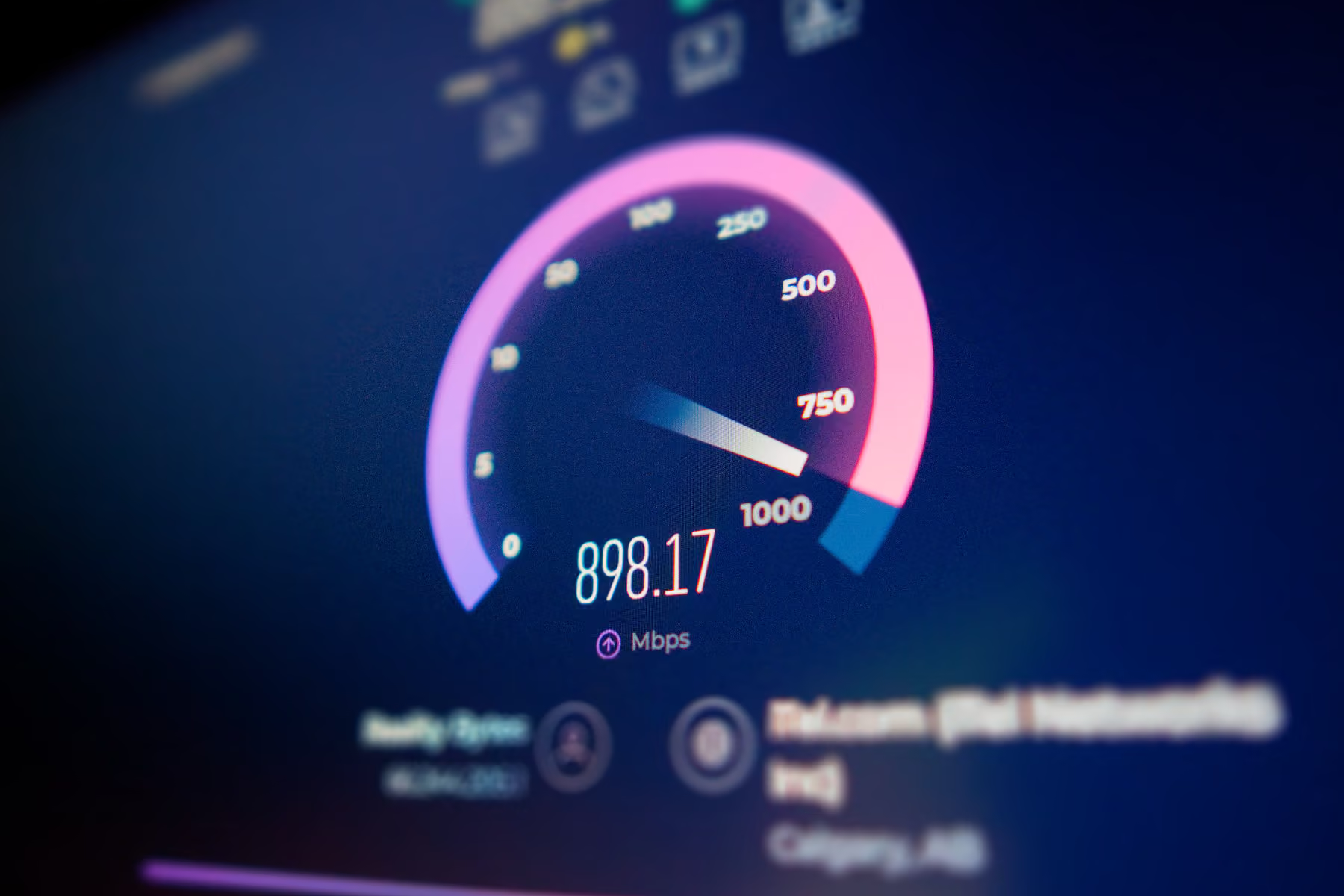
“We should be doing a blog post centred around why it’s a good idea to upgrade your Wi-Fi to Wi-Fi 7 tech.”
Wi-Fi 7, the latest and greatest in wireless internet technology. Sure. It’s supposed to be redonkulous, and a lot of folks are probably at the 4-5 year mark where they need to think about replacing old Wi-Fi hardware. Might as well write about it, make a marketing push. And I’ll admit, between designing signage for our new office, writing for clients, shooting and editing video, and a lot more besides, I’ve been feeling a bit burnt out and uninspired about our own blog.
So, I poured myself a fresh coffee, rolled up my sleeves, and started digging.
My first stop was Intel’s website, with a page titled “What Is Wi-Fi 7?” Sounds promising. Good a place as any to start.
But as my eyes tracked down the screen, the glaring white background burning into my tired retinas, the fluorescents squealing softly above my head—we just recently moved all our servers from our current tiny office to our new building, so it’s damn quiet in here—I started to wonder…
Who is this for?
One paragraph in particular jumped out at me:
“The benefit for a typical Wi-Fi 7 laptop is a potential maximum data rate of almost 5.8 Gbps. This is 2.4X faster than the 2.4 Gbps possible with Wi-Fi 6/6E and could easily enable high quality 8K video streaming or reduce a massive 15 GB file download to roughly 25 seconds vs. the one minute it would take with the best legacy Wi-Fi technology.” 1
I had to let that sink in for a second. Speeds up to 5.8 Gbps. 5.8? And that’s just on the laptop. Typical routers and mesh systems can see throughput over 30 Gbps, 2 with some claiming up to 46 Gbps. 3
That’s absolutely bonkers. But it also raised some questions in my noggin. A lot of folks, like me, wouldn’t see that kind of speed in the real world, since most of us probably have internet speeds capped at 1 Gbps or less. Even many small and medium businesses don’t have internet that fast. My own laptop has Wi-Fi 6E, and I’ve always thought it was blazing fast. (We’ll come back to that later.)
Reading that, I started to think maybe Wi-Fi 7 wasn’t for me.
I’m a nerd. I watch tech videos and homelabbers on YouTube for fun. I’ve planned out what I’d want in my ideal cyberdeck, if I ever built one. We have an LTT screwdriver in our house (if you know, you know).
All this to say that I love tech and I know a bit about networks, though I’ll be the first to admit I’m far from an expert. So, I decided to investigate a little further. Apart from sheer speed, there must be SOME reason Wi-Fi 7 is a game changer.
I poured another coffee and dug a little deeper.
Turns out, there is. Of course there is. Wi-Fi 7 offers a whole slew of improvements over legacy Wi-Fi, which we’ll get into in a sec. First, I need to answer the question: who is this for?
Well, it’s for anyone who wants ultra-fast, responsive, low-latency Wi-Fi, naturally. It’s for anybody who struggles with buffering and lag. It’s for anyone with a lot of smart devices in their homes polluting the 2.4 GHz band. But most of all, Wi-Fi 7 is for businesses and professionals who depend on stable, fast, and reliable wireless internet to operate.
(I’m sure there’s an argument to be made for gamers too, but we’ll focus on the enterprise side of things today.)
So, if you need to update your network, should you keep Wi-Fi 7 on your radar? Yes.
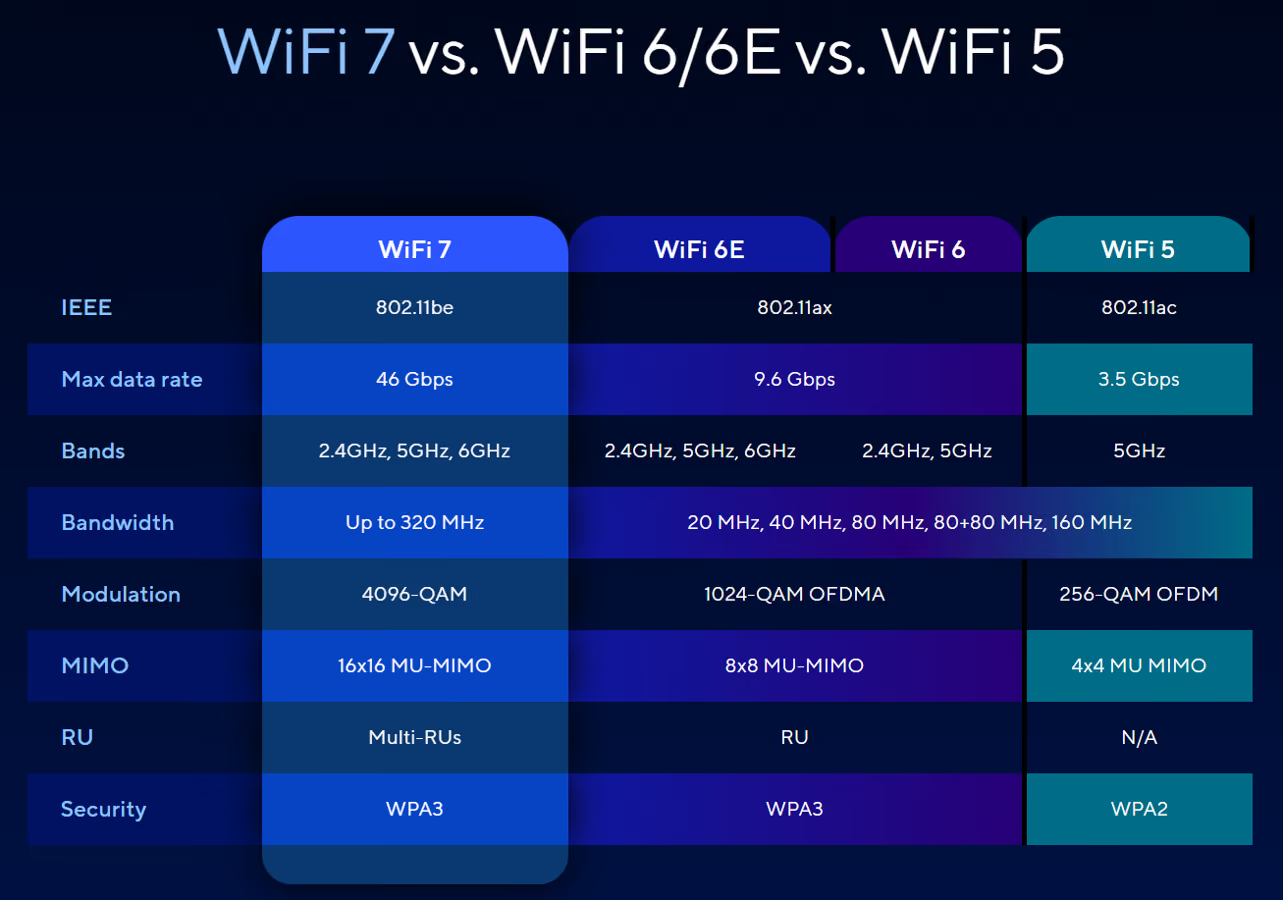
Okay, so we’ve established that my knee-jerk “ok bro” reaction to Wi-Fi 7’s blazing fast speeds may have been a bit premature. (But I mean really, 25 seconds to download a 15 GB file instead of one whole minute? How privileged are you?)
So, if speed alone isn’t your thing, what are the other benefits of Wi-Fi 7, and why should you upgrade your wireless network? (Because spoiler alert: you should.)
Let’s break it down.
But before we get into the nitty-gritty, I want to put your mind at ease by saying Wi-Fi 7 is backward compatible with Wi-Fi 4, 5, and 6 devices. So, if you upgrade your routers, mesh nodes, and access points to Wi-Fi 7, your older phones, laptops, and original Nintendo Switch will all still connect. They won’t be able to take full advantage of all the fancy new bells and whistles, but you won’t be left without internet. I know, you can breathe now.
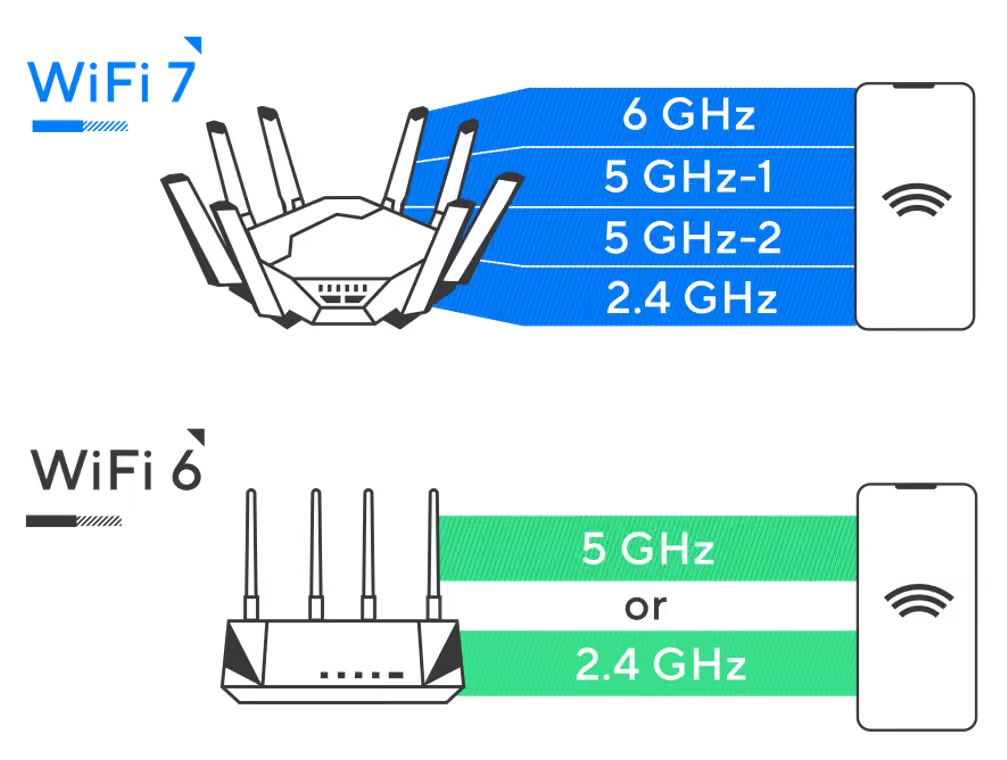
Because I don’t want to keep typing it out, I’m going to call it MLO (and I will be reading it in my head as Milo). This is, to me, one of the coolest parts of Wi-Fi 7.
Intel uses a nice highway analogy, so I’m going to shamelessly borrow that here.
If we imagine your network as a series of highways, with trucks moving loads of data from point to point, we can simplify how MLO works. Right off the bat, Wi-Fi 7 already brings bigger trucks to the table than older Wi-Fi, packed with more boxes. More data is transmitted at once, which alone makes it faster. But that’s not even the cool part.
So, you have these highways. Each band of your network (like 2.4 GHz and 5 GHz) is a different highway. Older Wi-Fi trucks can switch highways if there’s a traffic jam, but they can only take one highway at a time. Wi-Fi 7’s trucks can drive on two highways at once, so they can get where they’re going more quickly while avoiding heavy traffic. That’s MLO. And that’s awesome.
If, like me, you’ve ever been frustrated by your laptop dropping network connection when changing bands or moving between access points (especially problematic for AMD laptops, it seems), then Wi-Fi 7 might alleviate this headache for you (driver quirks aside). That alone is enough to make me want to upgrade the Wi-Fi chip in my laptop.
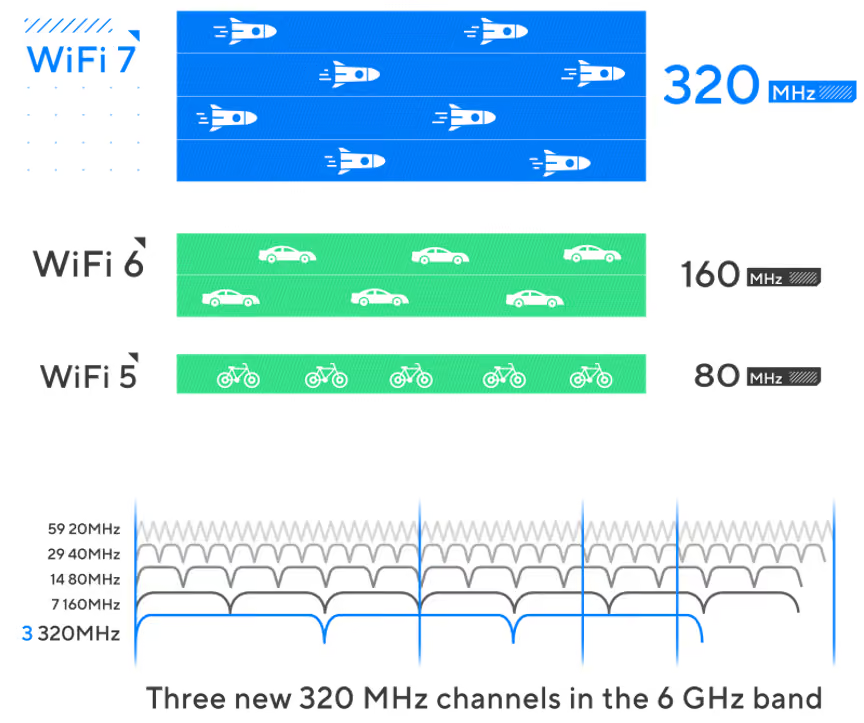
Wi-Fi 7 is not the first to upgrade data channels. In fact, Wi-Fi 6E devices can take advantage of the very same ones. The 2.4 GHz band is probably overcrowded in your home or office, since so many devices use it. So, you switch to the 5 GHz band, or maybe 6 GHz if you’ve got it. This is nothing new. So, how does Wi-Fi 7 improve these channels?
It does what Pringles can’t: it makes them wider.
Wider channels mean more room to move, and therefore, faster data. Wi-Fi 7 doubles the channel width of the previous generation, bringing a whopping 320 MHz bandwidth across the 2.4 GHz, 5 GHz, and 6 GHz bands. This is how it can get those amazing throughput speeds that are 3X faster, sometimes more, than previous generation routers.
Okay, this has gone on for a while, so one last cool feature before we get to the conclusion. This one is called Puncturing.
Normally, I’d say that’s a bad thing. I punctured my leg on a tree stump when I was little, and boy do I not recommend that. But in this case, it’s fantastic. Let me tell you why.
Returning to our truck analogy. With older Wi-Fi, if even just one or two lanes are heavy with traffic, our little Wi-Fi trucks wouldn’t be able to drive on that highway (band), even though there are still a few open lanes. Essentially, if there’s any noise on a channel, the whole channel is unusable. Woof.
With Wi-Fi 7, even if there’s interference (heavy traffic), Puncturing isolates that interference so data can still be transmitted. Think of it like a bus-only lane, but for Wi-Fi 7 trucks. So, while the older trucks are forced to take another highway, Wi-Fi 7 can just change lanes and keep on trucking.
Anyone tired of this analogy yet?
Short answer: yes.
I kinda said that before, but I’m saying it again.
My initial reservations aside, Wi-Fi 7 offers a ton of worthwhile features that make it a fantastic upgrade over previous generations. And with that backward compatibility, you’ve really got nothing to lose.
Wi-Fi 7 devices have been around for a few years now, having first released in 2024. That means they’ve had time to iron out the kinks and bring that “new hotness” pricing down a bit. Today, you can get Wi-Fi 7 routers for extremely reasonable prices. (Just remember that you get what you pay for, so if you buy a cheap <$100 router, you may not see ALL the benefits of Wi-Fi 7.)
So, if you need to upgrade your network devices or even your phone, tablet, laptop, or whatever other client device, you might as well spring for the Wi-Fi 7 model. This will future-proof your Wi-Fi and bring a ton of quality-of-life improvements that you’ll thank yourself for later. You can bet we’ll be upgrading our network gear to Wi-Fi 7 with this move to our new building.
If you need to upgrade and don’t know where to start, let’s talk.
(And Pringles—if Wi-Fi can make its channels wider, you can do the same with your cans. Come on. We don’t have baby hands anymore.)
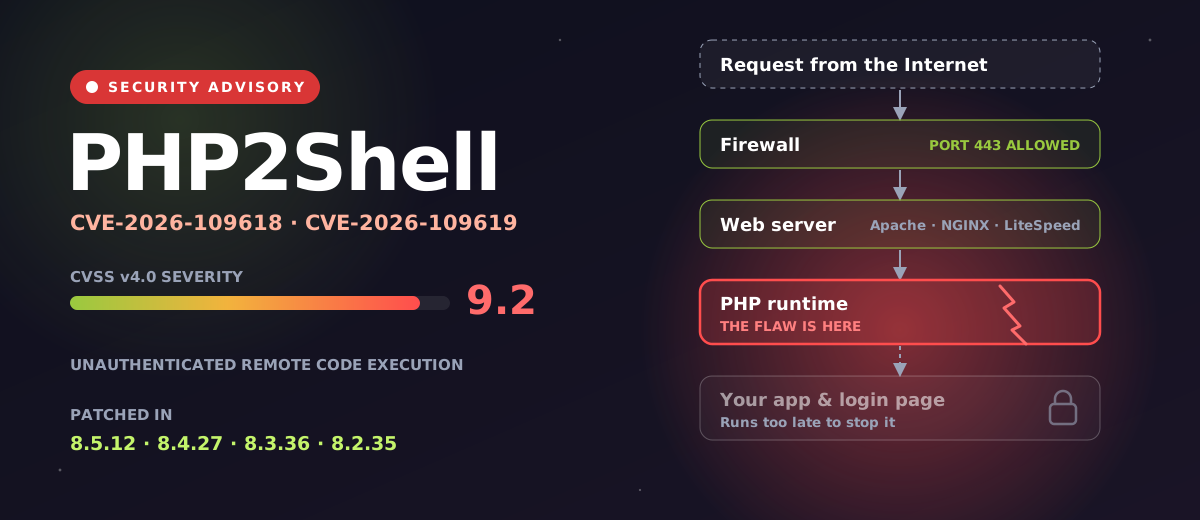
PHP2Shell (CVE-2026-109618, CVE-2026-109619) lets attackers run code on PHP servers without a login. What it means, fixed versions and what to do now.
October 21, 2026
Microsoft will retire SMS and voice sign-in codes in 2027. What it means for your business, why passkeys replace them, and how to prepare.
August 26, 2026
Canada’s new privacy law, Bill C-36, is coming. Learn what it means, what’s changing, and how your business can prepare.
June 30, 2026