It's a question we hear surprisingly often:
“Why should I spend more on a server when I can buy a powerful Lenovo desktop and run the same software on it?”
It's a fair question. A modern desktop can be incredibly powerful. Depending on the configuration, a high-end workstation may even have a faster processor than an entry-level server. You can install Windows Server on it. You can run Hyper-V virtual machines. You can host files, applications and databases.
So why do we still recommend purpose-built Lenovo ThinkSystem servers for business-critical infrastructure?
Because the two machines are built to answer different questions.
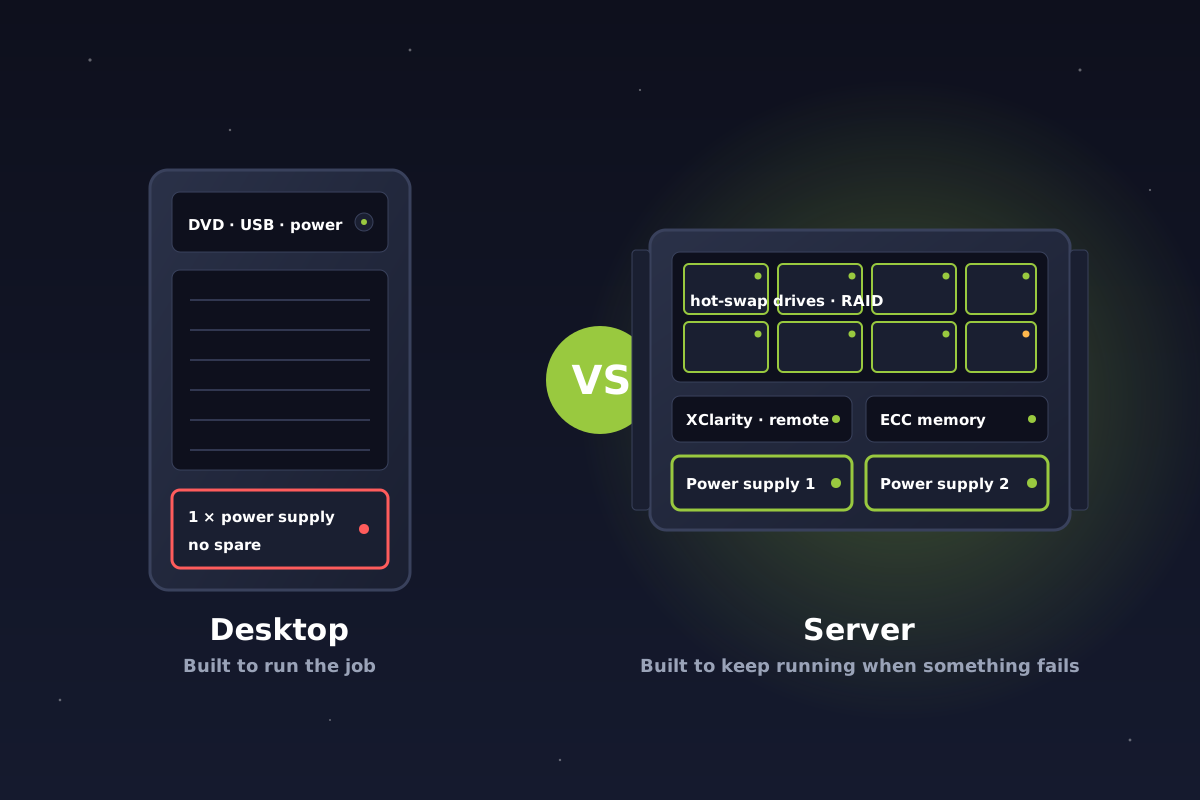
DesktopBuilt to run the job
Fast, affordable, great at being a computer. Assumes everything inside it keeps working.
vs
ServerBuilt to keep the job running
Designed for the day a part fails, with spares, warnings and remote hands built in.
A desktop is designed to run the workload. A server is designed to keep the workload running when something goes wrong. In business IT, that distinction is everything.
It isn't about speed
One of the biggest misconceptions about servers is that businesses buy them because they're faster. Sometimes they are. Sometimes they aren't. Put an expensive workstation up against an entry-level server and the workstation might win a few benchmarks.
That's missing the point. When Reality Bytes recommends server-class hardware, we're asking a different set of questions:
- What happens if a power supply fails?
- What happens if a drive fails?
- Can we diagnose the hardware remotely, even if Windows won't boot?
- Can parts be replaced without a lengthy outage?
- Does the memory protect against certain errors?
- Can the hardware warn us before a small problem becomes a big one?
- How quickly can we recover from a hardware issue?
- How much downtime can this business realistically tolerate?
That's where a purpose-built server starts separating itself from a desktop.
Tuesday, 10:00 a.m. A power supply dies.
Let's make it concrete. Same business, same software, same failed part. Two very different mornings.
On the desktop
- 10:00 The only power supply fails. The machine goes dark. Instantly.
- 10:01 Files, accounting, the database and every virtual machine on it are gone with it.
- 10:05 Phones start ringing. Nobody can work.
- 10:30 A technician is on the road to your office.
- Afternoon Diagnosis, a part to source, maybe a restore from backup onto something else.
- Tomorrow, maybe Back up and running. Lost day, emergency hours, frayed nerves.
On the server
- 10:00 Power supply 1 fails. Power supply 2 takes the load. The server doesn't blink.
- 10:00 The management controller raises an alert to our team.
- 10:02 Nobody in the office notices anything.
- Next visit A replacement supply is slid into the running server. No shutdown.
- Downtime Zero.
- Your day Normal.
Illustrative scenario. Exact timings depend on the fault, the site and the configuration.
That is the philosophy behind enterprise server hardware: whenever practical, don't let the failure of one component take down the entire system.
Consider something as simple as a power supply
A typical desktop contains a single power supply. If it fails, the computer shuts down. It doesn't matter whether you have redundant storage, excellent backups, an expensive battery backup or the best monitoring software in the world. The machine is down.
Many Lenovo ThinkSystem servers can instead be configured with redundant, hot-swap power supplies. Lenovo documents adding a second hot-swap supply for redundancy on models such as the SR630 V2 and SR650 V2. Rather than one failed component automatically becoming a server outage, the remaining supply keeps the server running while the failed one is replaced.
Server storage is about more than speed
Modern NVMe drives are incredibly fast, so it's tempting to drop a couple into a desktop and assume you've built a fantastic server. Speed is only part of the equation.
With business-critical storage we also care about drive redundancy, the RAID design, drive health monitoring, predictable failure handling, enterprise-class drive options, and keeping the service up while a drive is swapped. On compatible server configurations, hot-swap bays let a failed drive be replaced from the front of the machine while it keeps serving your staff.
The question isn't “how fast is this SSD?” It's “what happens to the business when this SSD eventually fails?” That's a much better question.
ECC memory adds another layer of protection
Servers commonly support ECC, or Error Correcting Code, memory, which is designed to detect and correct certain types of memory errors. Some professional workstations support it too, so it isn't exclusively a server feature.
The consequences of a memory error are very different, though, when the machine is hosting important business systems. Server memory may be holding a virtual machine, a database, Active Directory, a business application, filesystem operations or a running backup. Server platforms treat memory as part of the reliability design, not just a question of how much RAM fits.
Remote hardware management is a big deal
This is one of the biggest advantages for an IT provider like Reality Bytes.
We can install excellent remote monitoring and management software on any computer, but those tools depend on the operating system being healthy enough to run them. What happens when Windows doesn't boot? When the machine stops responding? When the problem lives below the operating system?
Purpose-built servers answer that with hardware-level management. Lenovo ThinkSystem servers include the XClarity Controller, a management processor that works independently of the operating system: power the server on or off, see hardware health and failure predictions, open a remote console, and set policies such as power redundancy, all from our office. For a server at a remote site, that can be the difference between a two-minute fix and a two-hour drive.
A server is designed to be serviced
Most desktops aren't built to have components replaced while everything else keeps running. Servers are. Depending on the model and configuration, power supplies, drives and fans are designed to be redundant, hot-swappable, or both. The objective isn't convenience. It's shrinking the window in which a hardware problem is also a business problem.
Side by side
| Desktop | Lenovo ThinkSystem server |
|---|
| Power supply | One. If it fails, everything stops. | Redundant hot-swap supplies on supported models. |
|---|
| Drives | Fast, but replaced with the machine off. | Hot-swap bays, RAID, health monitoring. |
|---|
| Memory | Usually standard memory. | ECC memory that detects and corrects errors. |
|---|
| When Windows won't boot | Someone drives to it. | XClarity Controller: diagnose and fix remotely. |
|---|
| Early warning | Little or none. | Hardware reports faults before they fail. |
|---|
| Serviceability | Shut down, open the case. | Swap parts while it runs. |
|---|
| Built for | Running the workload. | Keeping it running when parts fail. |
|---|
What does downtime actually cost?
This is where the conversation changes from IT to business. Imagine a company with 25 employees whose server hosts Active Directory, the company file shares, an accounting application, a database and several Hyper-V virtual machines. At 10:00 Tuesday morning a hardware component fails and the machine stops.
The cost isn't the replacement part. The real bill looks more like this:
Employees unable to work
Delayed customer service
Missed deadlines
Emergency IT work
Travel to your location
Lost productivity
After-hours recovery
A very long Tuesday
Suddenly, saving money by buying desktop-class hardware instead of a purpose-built server doesn't look quite so attractive.
Does this mean you should never use a desktop?
Not necessarily. Technology decisions should follow the business requirement, and there are situations where desktop or workstation hardware is perfectly reasonable.
1If this machine died at 10 a.m., could your team keep working until tomorrow?
2Is the workload light, with excellent backups and little reliance on local systems?
3Are you choosing a desktop because you accept the risk, not because “it's basically the same”?
Three yeses? A desktop may be a legitimate choice, with eyes open.
Any no? That workload belongs on a real server.
Choosing desktop hardware because the business can tolerate the extra risk is a legitimate decision. Choosing it because “it's basically the same thing as a server” is not. It isn't the same thing.
Why Reality Bytes recommends purpose-built servers
Our philosophy is that infrastructure should be designed around the importance of the workload it supports. If a machine runs Active Directory, Hyper-V, SQL Server, Remote Desktop Services, file services, accounting software or backups, we want it on hardware designed for that responsibility.
That means looking past processor speed and RAM to hardware redundancy, storage architecture, remote management, monitoring, serviceability, expansion, backup and disaster recovery, expected workload, acceptable downtime and future growth. It's the same approach we take to all hardware and software procurement: the objective isn't to sell the most expensive server possible. It's to design infrastructure appropriate for the business that depends on it. We prescribe, we don't sell.
The bottom line
A modern desktop can be incredibly powerful. It might even run your server applications perfectly for years. But that's not the real test.
The real test comes on the day something fails.
When your entire organization depends on one physical machine, performance is only part of the equation. Reliability, redundancy, serviceability, manageability and recoverability matter just as much. That's why we recommend Lenovo ThinkSystem servers for business-critical workloads. Not simply because they're servers, but because when your business depends on that machine, we want the hardware designed with that responsibility in mind.
Not sure whether your current setup passes the test? Our managed IT service includes planning, budgeting and forecasting your technology future, server included. Talk to us.
Sources